Home Software Blog FAQ About Contact ⬇ Download Free
HomeSoftware › RBS PDF Editor
RBS PDF Editor icon
v1.0.0 ✓ Windows 10/11 216 MB ZIP (Installer + Portable, ~108 MB each inside) 🛡️ Virus Free 📅 May 14, 2026

RBS PDF Editor

A free, offline, portable Windows PDF editor. Edit text in place, place images freeform with resize and rotate, OCR scanned papers with Tesseract, sign documents in one click, merge / split / rotate / reorder pages, convert PDF to Word / Excel / JPG / PNG, compress PDFs, add Bates numbering, password protection, hyperlinks and watermarks. Two builds shipped together — a standard installer that registers PDF file associations, and a single-file portable .exe that runs from a USB stick with no install and no admin rights. No account, no cloud, no telemetry, no watermark, no subscription. A genuine free Adobe Acrobat alternative for Windows 10 and Windows 11.

Preview
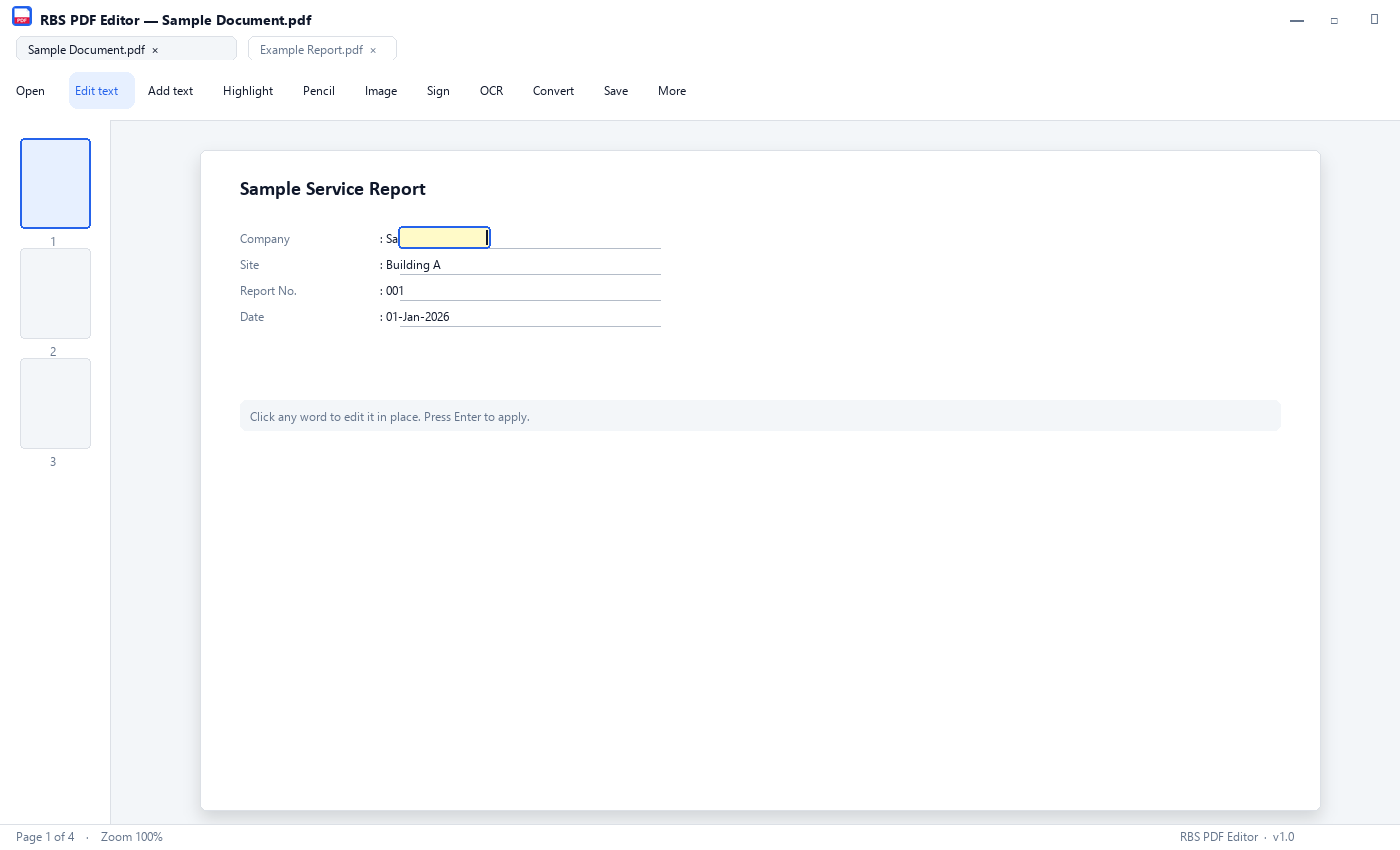
RBS PDF Editor screenshot

Key Features

✏️

Edit text in place

Click any word on the PDF and the text becomes editable right where it sits — same font, same size, no copy-paste dance.

🖼️

Place images freeform

Drop in a picture, drag the corner and edge handles to resize, rotate, or snap to page width. Click it later to adjust or delete.

🔍

OCR scanned PDFs

Make scans searchable and editable. Tesseract installs itself the first time you ask, then runs offline forever.

✍️

One-click signature

Draw your signature once with the mouse. After that, drop it on any document in one click. Saved only on your computer.

📑

Tabs, not windows

Open multiple PDFs in browser-style tabs. Double-clicking a PDF in Explorer opens it as a new tab in the running app.

💾

Carry it on a USB stick

The portable .exe runs from anywhere. Settings travel in a folder next to the file — same setup across every PC you touch.

📊

Convert PDF to Word / Excel

Export to .docx, .xlsx (pulls out tables), .jpg, .png. Compress PDFs to shrink file size without losing readability.

🔐

Password & permissions

Protect PDFs with passwords, set print / copy / edit permissions. Add Bates numbering for legal work, watermarks, and hyperlinks.

📐

Page management

Merge, split, rotate, reorder, auto-crop, and number pages. Drag and drop page thumbnails to reorganise.

🛡️

100% offline & private

No account, no cloud sync, no telemetry, no analytics, no watermark. The only network call is the optional one-time OCR download.

Version History

v1.0.0 Latest May 14, 2026
  • Initial public release — installer and portable builds in one ZIP
  • Edit text in place — click a word, type the new text, keeps the original font
  • Place images freeform with resize, rotate, lock aspect, snap to page width
  • OCR scanned PDFs with Tesseract (auto-downloads on first use, offline thereafter)
  • One-click signature — draw once, drop on any document
  • Multi-PDF tabs — double-click in Explorer adds a new tab
  • Stacked OCR-layer detection — cleans up "Regarding Regarding" doubling
  • Convert PDF to Word (.docx), Excel (.xlsx), JPG, PNG; compress PDFs
  • Page management — merge, split, rotate, reorder, auto-crop, Bates numbering
  • Password protection, watermarks, hyperlinks, page numbers
  • F1 / Help menu / right-click → guided first-time tour replay
  • Portable .exe — no install, runs from USB, settings travel with the file

Frequently asked questions

Is RBS PDF Editor really free?
Yes. Completely free for personal and commercial use. No trial, no time limit, no feature gating, no subscription. You can download it once and use it forever — and use it on as many computers as you want. If it saves you time and you want to drop a tip, donations help keep the project alive but they are never required.
Does it add a watermark to my PDFs?
No. Never. Every other "free" PDF editor I tried either adds a watermark to the output or limits free use to a few documents per day. RBS PDF Editor does neither. Whatever you save looks exactly like what you edited — clean, unmarked.
Do I need to sign up or create an account?
No. There is no account system in the app. There is no email field, no sign-in screen, no cloud sync. You download the .zip, run the installer or portable .exe, and start editing. The app never asks for credentials of any kind.
Does it work offline / without internet?
Yes, fully offline. The only network call the app ever makes is the one-time Tesseract OCR installer download (around 80 MB) the first time you choose to OCR a scanned PDF. After that, OCR also runs offline. If you never use OCR, the app has zero internet contact.
Can I run it without installing — like from a USB stick?
Yes. The download includes a portable build called RBSPDFEditor_Portable.exe. Copy it to a USB stick, a Desktop folder, or a network share. Double-click to launch — no installation, no admin rights required. Settings live in a folder next to the .exe so they travel with you between PCs.
Is this a good Adobe Acrobat alternative?
For most people, yes. RBS PDF Editor covers edit text, add images, sign documents, OCR scans, merge / split / rotate / reorder pages, password protection, Bates numbering, watermarks, hyperlinks, and conversion to Word / Excel / JPG / PNG. Adobe Acrobat costs around 20 USD per month; RBS PDF Editor is free, offline, and includes a portable build. If you need the advanced redaction or PDF/A archival features Adobe sells to enterprises, that is still a niche where Adobe wins. For everyday editing, signing and form filling, this replaces Acrobat completely.
Can it edit scanned PDFs (with OCR)?
Yes. Click the OCR button on the toolbar, choose "Searchable PDF", and the editor will run Tesseract OCR on the scan. After OCR you can search the document with Ctrl+F, select and copy text, and even edit any word with the Edit Text tool. It also handles stacked OCR layers — files where someone ran OCR twice and you see "Regarding Regarding" doubling — and cleans that up automatically.
Can I sign a PDF for free with it?
Yes. Open the Signature tool, draw your signature once with the mouse, and after that you can drop the same signature onto any document with a single click. Your signature is stored only on your computer, never uploaded anywhere.
Can it convert PDF to Word and Excel?
Yes. The Convert menu exports your PDF to .docx (Word), .xlsx (Excel — pulls out tables), .jpg, and .png. There is also a Compress action that shrinks PDF file size without obvious quality loss. All conversions happen locally on your machine — your file is never uploaded.
Does it work on Windows 10?
Yes. RBS PDF Editor supports Windows 10 and Windows 11 (64-bit). You need around 250 MB of free disk space for the installed version, or about 110 MB for the portable .exe alone.
Is OCR included or does it cost extra?
Included and free. The OCR engine is Tesseract — an open-source project — and the app downloads it on first use (about 80 MB, one time only). After that, OCR works offline forever, with no per-page fees or upload limits.
Can it do Bates numbering for legal documents?
Yes. Open the More menu, choose Bates numbering, set your prefix, starting number, and position. The editor applies the stamp across every page in the document. Useful for legal discovery, paralegals and small law firms that need Bates without buying a dedicated 400 USD specialist tool.
Where are my files stored — locally or in the cloud?
Always locally. Your PDFs never leave your computer. The app does not upload, sync or back up anything. The only files the app writes to disk are its own settings (under %APPDATA%\RBSPDFEditor for the installer build, or in a folder next to the .exe for the portable build), plus a small log of clicks and edits — never the contents of your PDFs.
Why is the download 216 MB? That is bigger than other PDF editors.
Because the .zip contains both builds — the regular installer AND the portable .exe — bundled together so you have a choice. Each .exe inside is around 108 MB. The size also covers the full PyMuPDF rendering engine, pikepdf, and the GUI toolkit; we ship everything needed so the app works on a fresh Windows install without you having to install Python or other runtimes.

Download

Versionv1.0.0
Size216 MB ZIP (Installer + Portable, ~108 MB each inside)
LicenseFreeware
PlatformWindows 10/11
ReleasedMay 14, 2026
SHA-256:
EC864450792199E86F3211FA724A121DEE8312D1C620FD9E2F410C01B98F5FD1
VirusTotal: View scan →
0 downloads

Security

🛡️ Scanned — No Malware

No adware, no spyware. Clean software you can trust.

System Requirements

Windows 10 or Windows 11 (64-bit)
~250 MB free disk space (installed) or ~110 MB (portable .exe alone)
2 GB RAM minimum (4 GB recommended for large PDFs)
Internet only needed once, for the optional Tesseract OCR download (~80 MB)
No admin rights required for the portable build
No account, no subscription, no internet otherwise

Support RBS ❤

Keep Rare Build Software free by making a small donation.

❤ Donate