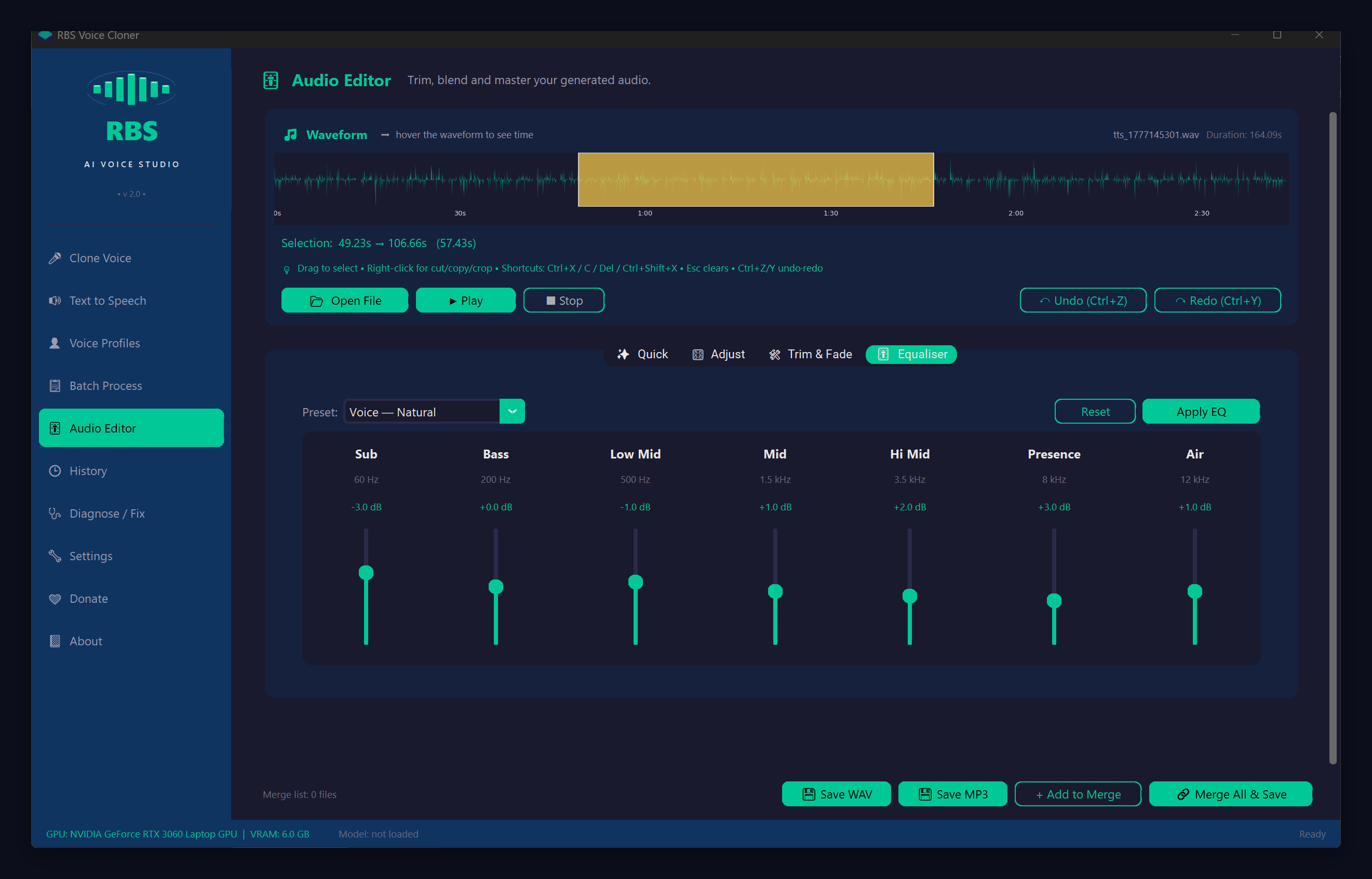
The 7-band parametric equaliser in RBS Voice Cloner V2 isn't a generic music EQ — the bands are placed where voice problems actually live. This guide walks through what each band does, when to use which preset, and how to fix common cloning artefacts with a couple of slider moves.
The 7 bands and what they do
- Sub — 60 Hz. Below voice. Cut this to remove HVAC rumble, traffic noise, mic-stand bumps. Boosting adds nothing useful for voice.
- Bass — 200 Hz. Body / chest. Boost for warmth and a "fuller" voice. Cut if the voice sounds boomy or muddy.
- Low Mid — 500 Hz. Where "muddy" lives. Cut a couple of dB if the voice sounds boxy or congested.
- Mid — 1.5 kHz. Intelligibility. Boost slightly for vocals that need to cut through a mix. Don't go crazy — too much makes it harsh.
- Hi Mid — 3.5 kHz. Presence. Boost for clarity and "in your face" sound. The sweet spot for podcast voices.
- Presence — 8 kHz. Air and breathiness. Boost lightly for sparkle. Boost too much and you'll get sibilance ("sss" sounds spike).
- Air — 12 kHz. Top-end shimmer. A small lift here makes everything sound more "produced". Useful in tiny amounts.
The 6 presets — when to use each
Voice — Natural
Light cleanup with a slight presence + air boost. Use this as your default. Light cut at Sub (rumble removal) and a small lift at Hi Mid + Air for clarity. 80% of the time this is the right starting point.
Voice — Warm
Bass + Low Mid boost. Use for narration, audiobook reading, intimate-sounding voiceovers. Especially good for thinner-sounding cloned voices. Avoid if the source already sounds boomy.
Voice — Bright
Hi Mid + Presence + Air boost. Use when a voice sounds dull, distant, or "behind a curtain". Pulls the vocal forward in the perceived mix. Don't combine with Warm — they fight each other.
Podcast
Standard podcast EQ curve: cut sub-bass, lift presence, gentle air boost. Use for any spoken-word content destined for headphone or earbud listeners. This is the preset most podcast hosts pay $$ for in commercial plugins.
Phone
Narrow-band telephony filter — cuts everything below 300 Hz and above 3.4 kHz. Use for stylised effects (voicemail, phone-call simulation, retro radio sound). Don't use for general listening.
Flat
Zero everything. Useful as a starting point for manual tweaking, or when you want to undo a previous preset. Click Reset instead if you want to revert the audio AND zero the sliders.
Common voice problems and how to fix them with EQ
"Sounds muddy / boomy" — Cut Low Mid (500 Hz) by 2–4 dB. If still boomy, cut Bass (200 Hz) by 1–2 dB.
"Sounds thin or distant" — Apply Voice — Warm preset. Or boost Bass (200 Hz) and Low Mid (500 Hz) by 2 dB each.
"Sounds dull or muffled" — Boost Hi Mid (3.5 kHz) by 2–3 dB. Add a small Presence (8 kHz) lift if needed.
"S sounds are harsh / sibilant" — Cut Presence (8 kHz) by 1–2 dB. Don't cut more than 3 dB or the voice goes lispy.
"There's background hum / rumble" — Cut Sub (60 Hz) all the way down. Combine with the Remove Noise Quick effect on the Audio Editor.
"Cloned voice sounds robotic" — Apply Voice — Natural, then boost Air (12 kHz) by 1 dB. Slight breath in the top end masks XTTS v2 artefacts.
Workflow tips
- EQ last. Trim → noise reduction → volume normalise → THEN EQ. EQ on noisy or unbalanced source is harder.
- Apply, listen, undo if needed. The Reset button reverts the audio to its pre-EQ state, not just the sliders.
- A/B with Bypass. Click Apply EQ, listen, then Reset and listen again. The change should be obvious or you've over-EQed.
- Different output medium = different EQ. Phone speaker = lift Mid. Studio headphones = subtle Air. Podcast → tucked in a car = use Podcast preset.
What about the Audio Editor's other effects?
EQ is just one tab in the redesigned editor. The Quick tab has Normalise (matches loudness), Remove Noise (broadband noise reduction), Reverse (gimmicky but fun), and Auto-Trim (cut silence from start/end). The Adjust tab has Volume / Speed / Pitch sliders + Echo. Trim & Fade does what you'd expect. Read the full overview in the V2 launch post.